
The Biggest Mistake Kindle Fire
Cover Designers Make
FTC Disclosure: If you make a purchase via a link on this site, I may receive a small commission. There will be no added cost to you. Thank you!
After typing up my article about the Best Kindle Fire Cover I thought it only appropriate to write one about the worst Kindle Fire cover!
Since discovering a huge design issue that basically ruins a cover's usefulness, I figured any cover with this mistake could qualify for the worst Kindle Fire cover. (See my Kindle Fire Accessories page to learn all about covers, cases, and more!)
Kindle Fire Covers With Stands
I first explained this huge mistake in my article, How to Choose a Kindle Fire Cover, (see the "Important Note!" near the bottom of the page) in which some covers have been badly designed with the stand placed upside-down! (What numb-skulls!)

Technically, the stand works to actually hold up your tablet, but when watching movies (or using apps that don't allow you to automatically rotate the screen 180 degrees, which many do not) the video is upside-down.
Here's a picture of this mistake. The Kindle Fire is properly attached to the cover, and the landscape stand is propping it up, but the Kindle Fire game, Fruit Slice, is upside-down.
It's On the WRONG Side!
What this error means, is that the cover's stand causes the speakers (located at the top of your device) to be at the bottom (for portrait stands) or on the RIGHT side when in landscape mode.
When this is the case and you turn on a movie (or open up a non-rotating app) the picture will be upside-down because the video does not rotate but stays in one single position.
Thus, the stand was placed on the wrong side of the Kindle Fire cover which affects all features that do not automatically rotate.
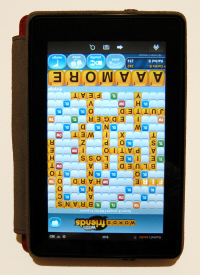
In this picture the Kindle Fire has been removed and reattached to the cover so the landscape feature works right, but now the portrait stand is upside-down.
As you can see, the game, Words With Friends, is not right-side-up.
With this particular cover only one stand can be properly used, while the other will always be upside-down for features that don't rotate.

Covers with stands that have the ability to rotate 360 degrees don't have this problem, of course, which is one of the main reasons why the covers I picked for the Best Kindle Fire Cover and Best Kindle Fire HD Cover are the winners.

This article is pertinent to Kindle Fire HD covers as well, because some of them have this same issue. Of course, the Kindle Fire HD tablets have better rotation but some apps/features still don't auto-rotate. So if you've got one of Amazon's new HD devices and are looking for a cover with a stand, be sure to read this entire article!
The Error of Their Ways
It's doubtful that the designers actually tested a Kindle Fire with each cover before creating and producing their product (probably in an attempt to get their items out to buyers as fast as possible) because if they did they would have realized this horrendous error.
Unfortunately, this huge mistake has
created a big issue for some unhappy Kindle Fire owners.
Kindle Fire Cover Culprits
Here is a list of the covers I've discovered that have this big design error with their built-in stands:
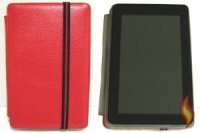
Accessorise Frameless Dual-View Kindle Fire Cover
This is the cover I first bought. I actually purchased it from AYL (who is no longer on Amazon), but these covers by Accessorise are exactly the same. Other than the stand issue, I've been quite happy with this accessory.
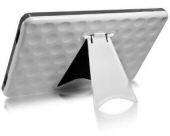
BoxWave Fairway Kindle Fire Cover with Collapsible Stand
In this picture you can see the speakers are to the right of the device (when in landscape) when they should be on the left. I don't think you can put a Kindle Fire backwards in this cover because the ports (for charging and turning your tablet on/off) would be blocked.
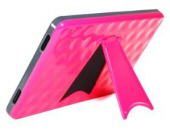
Cosmos Hard Case with Built-in Kick Stand
As you can see in the pictures, this is the exact same case (except it's bright pink) but is sold from another vendor. So be aware that different sellers sometimes sell the same products.
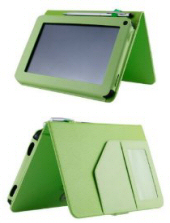
HHI Folio Case with Magnetic Viewing Stand
At first this Kindle Fire Cover looks fine, but again, if you look closely, you can see that the landscape stand has this design mistake. One way to tell is in the top picture where the hole for the light sensor is at the top right corner of the cover. When the stand is correct, it should be at the bottom left corner.

Marware Eco-Vue Kindle Fire Cover
Here is another landscape stand that puts the screen upside-down with the speakers on the right instead of the left.
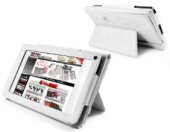
Tuff-Luv Bi-Stander Kindle Fire Cover with Stand
This cover is similar to the one listed at the top, which has two stands, one for portrait and one for landscape. Unfortunately, it too is a culprit of the biggest mistake that Kindle Fire cover designers make!
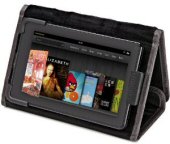
Timbuk2 Professor Jacket with Viewing/Typing Stand
At first this one also appears to be fine, but when you zoom in on the picture you can see that the light sensor is once again in the wrong spot at the top right corner.
If you find others please let me know and I will add them to this list!

Important Note!
Just one last thing to be aware of when shopping for a Kindle Fire cover.
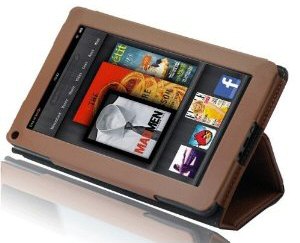
Some covers with stands do work properly for some of the angles, but not all of the angles! There are a lot of these out there, so be sure to check out this example so you know what to look for:
Correct!
(Speakers on left;
sensor hole bottom left)

Incorrect!
(Speakers on right;
light sensor top right)
(Pictures are of the Splash Safari Slim-Profile Kindle Fire Cover)
The tricky little buggers always show pictures of how the Kindle Fire looks great in the cover and at multiple angles, but they only use the same old picture (you know the one with the book cover of MadMen, as seen above). What they don't show you is that non-rotating videos and apps will be (yes, I've said it 100 times) upside-down.
Of course, if you don't watch videos, or use apps on the lower angle, then these stands are fine... but if a stand doesn't properly work 100%, what's the point of it?
Anyway, these are just my thoughts and experiences with using a Kindle Fire cover with a stand. If you agree/disagree I'd love to hear your side of things!
Check It Out!

Now that you know the biggest mistake that Kindle Fire cover designers make, be sure to thoroughly check into each cover you are thinking of buying if you want one with a stand
Read the reviews, check the pictures, and be sure the stands are in the proper place and position to work with your tablet. See How to Choose a Kindle Fire Cover for more details.
And if you haven't yet checked it out, take a look at my pick for the Best Kindle Fire Cover!
I ♥ My Fire!
- Christine
 |
 |

Search this site!


By Christine Albury, Owner of LoveMyFire.com
©Copyright 2024 Love My Fire All rights reserved.
No reproduction permitted without permission.
Please read the Terms of Use , Disclosure, and Privacy Policy before using this site.
LoveMyFire.com is a participant in the Amazon EU Associates Programme, an affiliate advertising programme designed to provide a means for sites to earn advertising fees by advertising and linking to Amazon.co.uk/Local.Amazon.co.uk/Amazon.de/de.BuyVIP.com/Amazon.fr/Amazon.it/it.BuyVIP.com/Amazon.es/ es.BuyVIP.com and is also a participant in the Amazon Services LLC Associates Program, an affiliate advertising program designed to provide a means for sites to earn advertising fees by advertising and linking to amazon.com or myhabit.com.
Subscribe to Love My Fire's Kindle Fire Newsletter!

To be notified of new Kindle Fire news, deals, articles, exclusive content, and more subscribe to my Kindle Fire Email Alerts!
I hate spam too and promise to only send you Kindle Fire Alerts.
(See Privacy Policy for details.)

Leave a Comment:
I love receiving your comments, but please read the notes below before posting. Thank you!NOTES:
- I continue to receive questions I've already answered in my FAQ or in articles on my site. PLEASE check there first!
- All comments are moderated. If you leave the page you won't see your comment until it is approved.
- Select the "Post to Facebook" check box to be notified on FB when a reply has been posted.
- If you scan the previous comments you may find an answer to your question. Click the "View X more" link at the bottom (if visible) to see all comments.
- If you're having trouble accessing my exclusive Kindle Fire articles, please email me directly instead of posting in these comments.
Thanks for sharing!